Running ESLint#
To run ESLint as a client-side tool:
-
Enable ESLint and configure the corresponding code patterns on your repository Code patterns page.
-
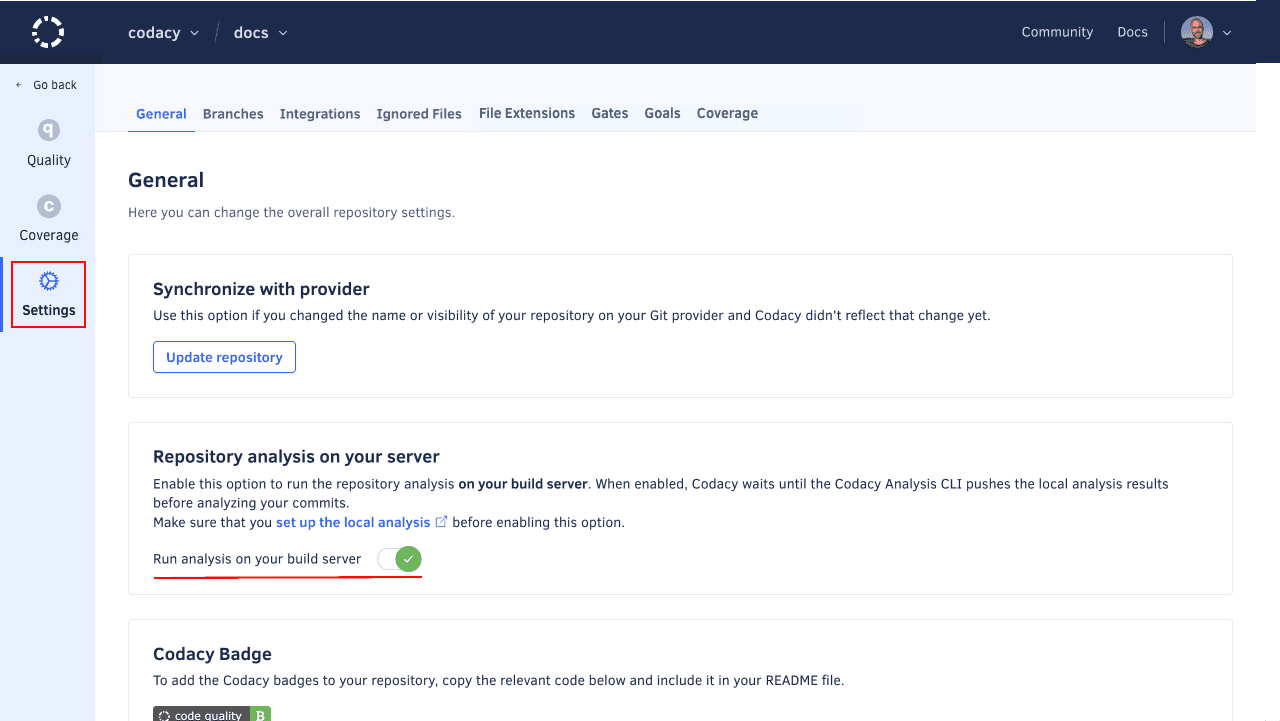
Enable Run analysis on your build server on your repository Settings, tab General, Repository analysis on your server.
This setting enables Codacy to wait for the results of the local analysis before resuming the analysis of your commits.
-
Set up an API token to authenticate on Codacy:
-
If you're setting up one repository, obtain a repository API token and set the following environment variable to specify your repository API token:
export CODACY_PROJECT_TOKEN=<your repository API token> -
If you're setting up multiple repositories, obtain an account API Token and set the following environment variable to specify the account API token:
export CODACY_API_TOKEN=<your account API token>
Warning
Never write API tokens to your configuration files and keep your API tokens well protected, as they grant owner permissions to your projects on Codacy.
It's a best practice to store API tokens as environment variables. Check the documentation of your CI/CD platform on how to do this.
-
-
If you're using Codacy Self-hosted set the following environment variable to specify your Codacy instance URL:
export CODACY_API_BASE_URL=<your Codacy instance URL>
Manual configuration#
Install the Codacy Analysis CLI and initialize the repository. Initialization writes .codacy/codacy.config.json, which analyze requires: pulling it from Codacy Cloud with init --remote means the local run uses the same ESLint patterns as your repository's Code patterns page.
npm i -g @codacy/analysis-cli
codacy-analysis init --remote <gh|gl|bb> <ORGANIZATION> <REPOSITORY>
Then run the analysis and upload the results:
codacy-analysis analyze --tool eslint9 --output-format sarif --output eslint.sarif
codacy-analysis upload eslint.sarif --commit $COMMIT_SHA
If you're using an account API token, you must also provide the --repository flag with your provider, organization, and repository name. You can obtain these values from the URL of your repository dashboard on Codacy:
codacy-analysis analyze --tool eslint9 --output-format sarif --output eslint.sarif
codacy-analysis upload eslint.sarif --commit $COMMIT_SHA --repository <gh|gl|bb> <ORGANIZATION> <REPOSITORY>
Note
--tool matches against the tool IDs in your .codacy/codacy.config.json, and only tools listed there run. If --tool eslint9 doesn't match your setup, check that file for the ID it recorded, which is ESLint9 for ESLint 9.x and ESLint8 for ESLint 8.x.
Important
On Codacy Self-hosted, upload sends results to a different endpoint from the rest of the CLI, and it doesn't read CODACY_API_BASE_URL. Point it at your instance with CODACY_RESULTS_API_BASE_URL as well:
export CODACY_RESULTS_API_BASE_URL=<your Codacy instance results API URL>
GitHub Action#
The GitHub Action still uses Codacy CLI v2, a separate tool from the codacy-analysis CLI used above. It reads its runtime and tool versions from a .codacy/codacy.yaml file in your repository:
runtimes:
    - node@22.2.0
tools:
    - eslint@9.3.0
Using a project token#
- name: Run Codacy CLI
  uses: codacy/codacy-cli-v2-action@main
  with:
    project-token: CODACY_PROJECT_TOKEN
    tool: eslint
    upload_report: true
Using an account API token#
- name: Run Codacy CLI
  uses: codacy/codacy-cli-v2-action@main
  with:
    api_token: CODACY_API_TOKEN
    tool: eslint
    upload_report: true
    provider: gh
    owner: codacy-acme
    repository: sample-javascript-project
Tokens should be stored in the repository secrets.
Was this page helpful?
Your feedback helps us improve the documentation.
255 characters left
Thanks for helping improve Codacy documentation.
For more detailed feedback, open an issue on GitHub.