FAQs#
How do I install Codacy Guardrails?#
Please have a look at our documentation
Does Guardrails only work with AI-generated code?#
No. While Guardrails does scan and autofix AI code as part of the agent flow, it scans any code shown in your IDE in real-time, regardless of how it was written.
How's Guardrails different from Codacy’s traditional analysis?#
Guardrails is IDE-first and real-time. It complements Codacy’s platform analysis by catching issues earlier in the development cycle.
Does Guardrails work offline?#
Yes, local scanning via Codacy CLI works offline. API-based features (like querying metrics) require connectivity.
Which AI security and quality standards can I enforce with Guardrails?#
Codacy Guardrails detects and autoremediate security risks and quality issues in JavaScript, TypeScript, Python, and Java, including:
- SAST vulnerabilities
- Hardcoded secrets
- Insecure dependencies
- Error prone code
- Performance issues
- Best practices
- Complex code
- Code duplications
- Styling violations
Configuring and enforcing coding standards at scale across all IDEs in your organization requires a Codacy Team or Business subscription.
Is my data secure?#
Codacy Guardrails isn't a large language model, but an IDE extension that uses an MCP Server to communicate with existing AI coding agents owned by the user.
When I change some analysis configuration in the UI, is it automatically applied to Guardrails?#
Not immediately, but you don't have to do anything special either. For a repository connected to Codacy Cloud, Guardrails re-syncs your local configuration in the background whenever you add a new file to the repository, pulling a fresh copy of your patterns from Codacy Cloud. Changes you make in the UI are picked up on that next sync.
To force the sync right away, you can run the standalone Codacy Analysis CLI in your repository:
npm i -g @codacy/analysis-cli
codacy-analysis update-config
The IDE extension bundles its own copy of the analyzer, so this npm install is only needed to run the command yourself.
Does guardrails generate code for me?#
Guardrails itself doesn’t generate anything but we inform the AI agent where issues are located and scan generated code using the Codacy CLI.
How much does Guardrails cost?#
Codacy Guardrails is a free IDE Extension for local scanning of AI-generated and human-written code, available free of charge to all developers.
Check our Team and Organization plans to unlock:
- Central configuration and enforcement of AI coding standards across teams and projects
- Query and autofix existing problems across your codebase from the AI chat panel
- Generate custom security and code quality reports using AI prompts
-
Full access to the Codacy Cloud platform including:
-
Pipeline-less AppSec and code quality scans
- PR merge gates
- Team dashboards
- Security reports
- DAST pipelines
- Jira integration
Does Guardrails work with all OS?#
Guardrails is supported on MacOS, Linux, and Windows, natively for Visual Studio Code, Cursor, and Windsurf. JetBrains IDEs on Windows still require WSL.
Can I use Guardrails without an AI copilot?#
Codacy Guardrails is designed to be installed from our IDE extension for VS Code, Cursor and Windsurf, but as long as you have an AI code generator that's compatible with the MCP protocol you can also add Guardrails into your MCP configuration manually.
Without an AI coding agent, you can still use the IDE extension for local analysis and PR check information.
How can I install a specific version of the IDE extension?#
If you wish to continue using a previous version a little longer, you can do so by:
-
Open the Extensions tab
-
Select
Codacy -
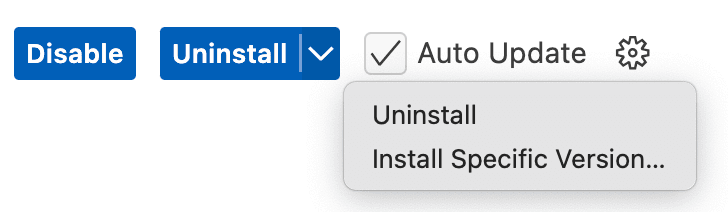
Click on the down arrow on the right of the Uninstall button
-
Select
Install specific version...
-
Select the version you want on the top search bar
-
Click on
Restart Extensionswhen that button appears
Keep in mind that the IDE extension is under active development, so be sure to check for updates regularly.
To revert to the latest version, click on Update.
Was this page helpful?
Your feedback helps us improve the documentation.
255 characters left
Thanks for helping improve Codacy documentation.
For more detailed feedback, open an issue on GitHub.